Health plan benefits at your fingertips.
Aurea is the app, and Sage is the AI agent inside it. I built an employer benefits app designed to let users browse their benefits with the ease of online shopping. I used Figma to design the screens, while Claude helped me publish the live web app. This project uses the same architecture as enterprise knowledge systems and context engineering for agent teams. The native iOS build is available on the App Store as of September 2026.
Health benefits apps tend to feel cold and clinical.
I reviewed a few benefits apps and noticed they are organized correctly, yet read like a clinical directory. They assume that the user knows the jargon. There’s dense text, little-to-no hierarchy, and no place that defines what benefit terms mean, which causes friction for users. In my five plus years as a Care Advocate I saw this firsthand through the user’s experience. Just a few questions could cost a user and a Care Advocate 15 to 30 minutes for something that should be instantly accessible.
The brief: keep what the app does, rebuild everything else around the App Store shopping pattern by leading with images that have one clear action per screen. I reused 90+ benefits from an actual carrier plan, a journey map, and reference screens. Constraints: solo build, no brand to start from, no actual user data. One category people avoid: AI care assistants barely have 15% engagement, only 4% of Americans can define terms like “deductible”, “copay”, “coinsurance” and “out-of-pocket max”, and 60% are uneasy with AI involvement in their care.

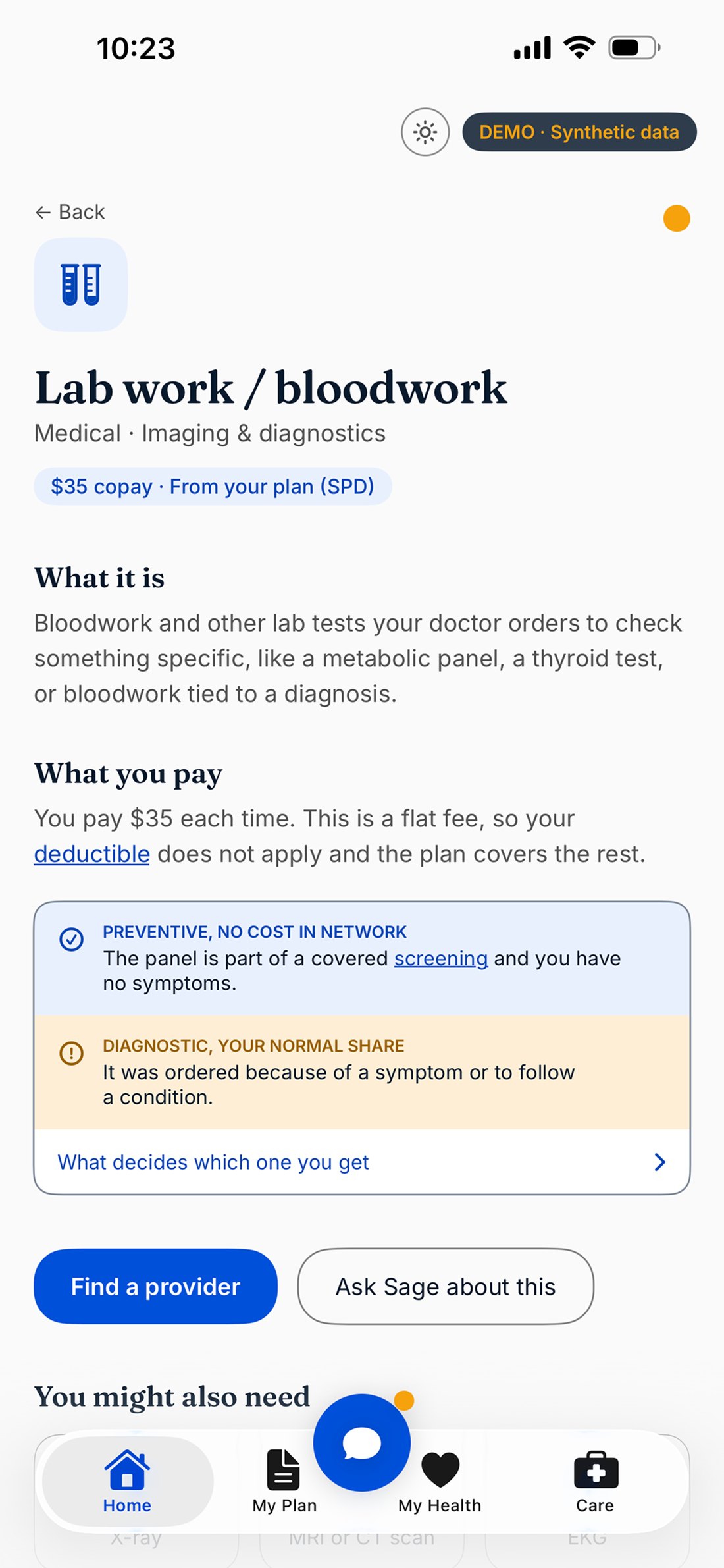
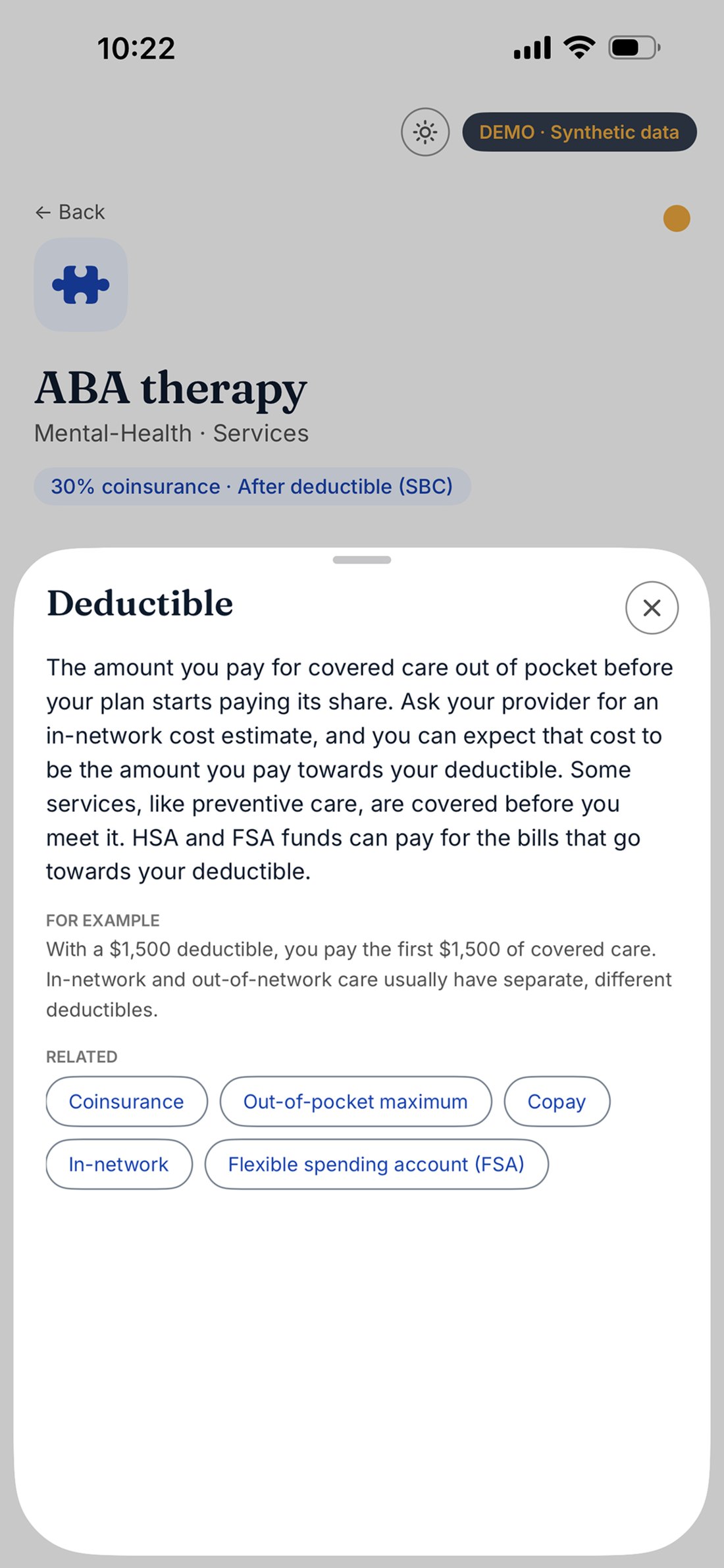
Eight decisions shaped the build.
A flexible data model.
Aurea is built on 90+ medical plan benefits, each priced differently per plan. Not every plan has the same coverage or the same benefits, so I split the benefit definitions (a shared jargon catalog) from the per-employer parts (cost, eligibility, limitations), and built five templates that can be filled with member-specific plan info: home/hub, shelf, benefit card, program card, detail. Adding an employer simply requires configuration, not design, which is what let the system flex across three breakpoints and three platforms without redrawing anything.
Image-led over text-led, and knowing when to use it.
A vendor's logo already says its name, so repeating it in text below is what made the grid read as a directory. I dropped the name from program cards and widened the logo band to stretch across the card. Then used a note to strip redundant text where I could find it. I made sure that benefit cards use generic icons, not logos, so the name is the only label instead of a duplicate, since removing it would have left nothing. “Redundant” is a property of the component, not of the instruction.
Write the constraint layer before the happy path.
In healthcare, what the agent must never do matters more than what it does. I wrote the hard rules first: give no clinical advice, exact dollars only for copays, coinsurance estimate comes from the provider, an explicit 911 list, abuse and bereavement handling. Every flow inherited safety instead of adjusting for it after the fact. Tested it live and caught Sage (the agent) quoting out-of-network coinsurance against the in-network deductible, which understated that member's potential costs by thousands of dollars, the exact surprise bill we aim to prevent. In-network and out-of-network benefits do not mix, enforced in code, not the prompt. The exception would be an embedded medical plan, which these are not.
A search bar that guides you.
A blank input field tells an anxious member nothing. Sage opens by naming the member and their plan, offers the human handoff before the first question, and gives four tappable chip options for the core tasks. The free-text field is still there. Each chat is bound to one member and their real plan document, so it answers like it knows you and cannot leak another plan's info, because it never receives them.
Trust the Summary Plan Description over the summary of it.
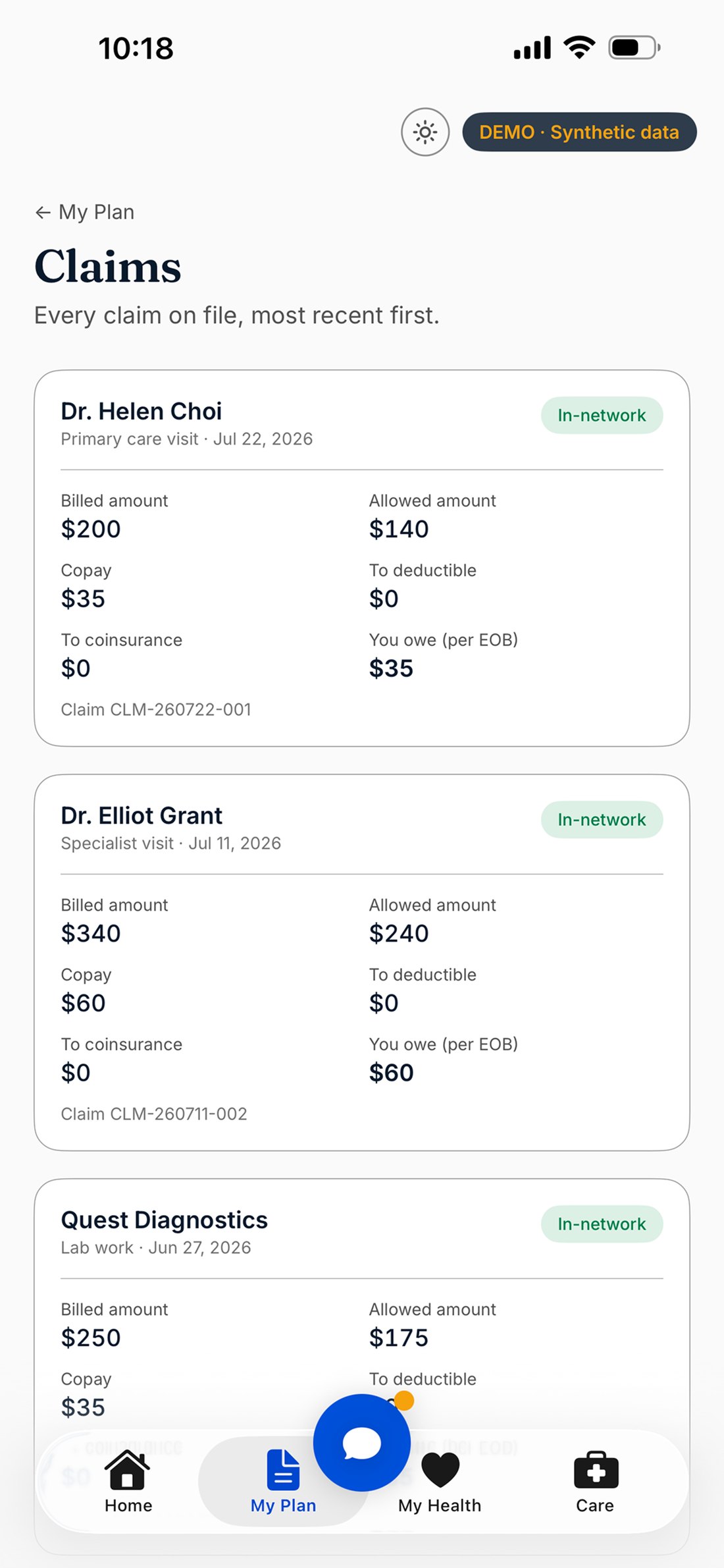
Sage told a member their specialist copay was $60; the app's own benefit page said $50. I followed that number and found four different answers. The issue is the cost layer hadn’t been pulled from any document. Because the genuine carrier plan documents I used were from prior to year 2025 and slightly inconsistent, I had invented the first plan's numbers to make screens look real, then scaled them across eleven more, which spread the guess and gave it the shape of a system. All twelve plans disagreed with their own plan description. The worst was an out-of-pocket maximum showing $3,200 compared to the actual $7,900. That’s half the true exposure. I re-grounded all twelve, 612 benefit entries, each tagged with the document its number came from. Two traps nearly shipped silently: the two documents state cost sharing from opposite sides in identical wording, so reading them the same way inverts every coinsurance figure; and the summary packs mental-health costs into one cell, so reading only the first clause quotes a flat copay for testing the plan actually prices at coinsurance.
A third surface on the same backend, not a second product with the same colours.
Figma and the web app both looked right, but neither proves a design system survives a native platform's own rules. I built Aurea as a real SwiftUI app pointed at the same API the web build calls, and ported every token 1:1. A native rebuild with its own content is just a second product in the same colors; sharing the backend makes one system across three surfaces a fact, so a taxonomy fix reaches web and native from one edit. It also surfaced problems the web never faced, like an iPadOS bug that renders a pushed screen's back button as a stray circle off the tab bar.
Design the vendors rather than borrow them.
At first the app shipped with a real carrier's branding and eight real vendor logos, because that made it read like a product, not a mockup. My disclosure already disclaimed affiliation, which is what impersonation rules care about. Then App Store Connect rules required attestation that you hold the rights to third-party content. I had no license for any of those logos or icons because this is a demo. A disclaimer disclaims affiliation; it does not license artwork. So I created vendor imagery instead, and deliberately did not mimic real names. The screens have the same effect, which is the point. The coverage numbers did not change, because published plan terms are facts in a way logo artwork is not.
Let the App Store submission audit the product.
Preparing the first submission meant reading the app the way a reviewer would, rather than from my view as a designer. All three “Ask Sage about this” buttons didn’t work, as well as four other buttons, which is the most important interaction in a project about an AI navigator. I caught six tinted squares that were tinted but empty and needed icons. I originally had the synthetic profile for a user named Jennifer Lopez as the default instead of Hermione, so Sage’s messages quoted from a member who stopped being the default months earlier. Fixing that meant ensuring user profiles would read from a single plan and cause no data link. In dark mode the profile switcher was near-black text on a dark list. I didn’t notice it at first because I designed and reviewed the screens on the same device in the same appearance. The biggest obstacle to pushing the demo as an app: my reviewer notes promise no login, but a flaky cold start left the app on a login screen with no way past it. Reviewer notes are part of the product, and only a full review catches that.


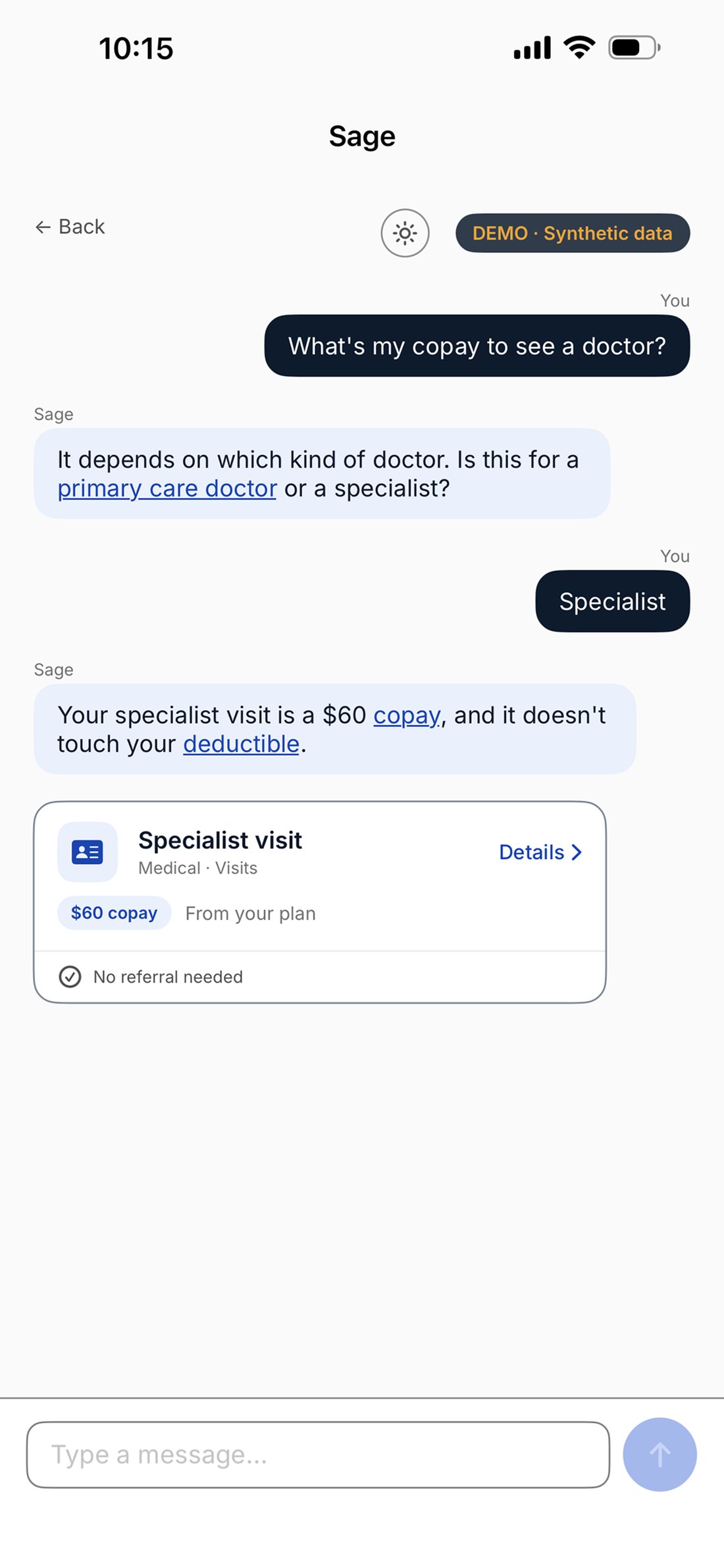
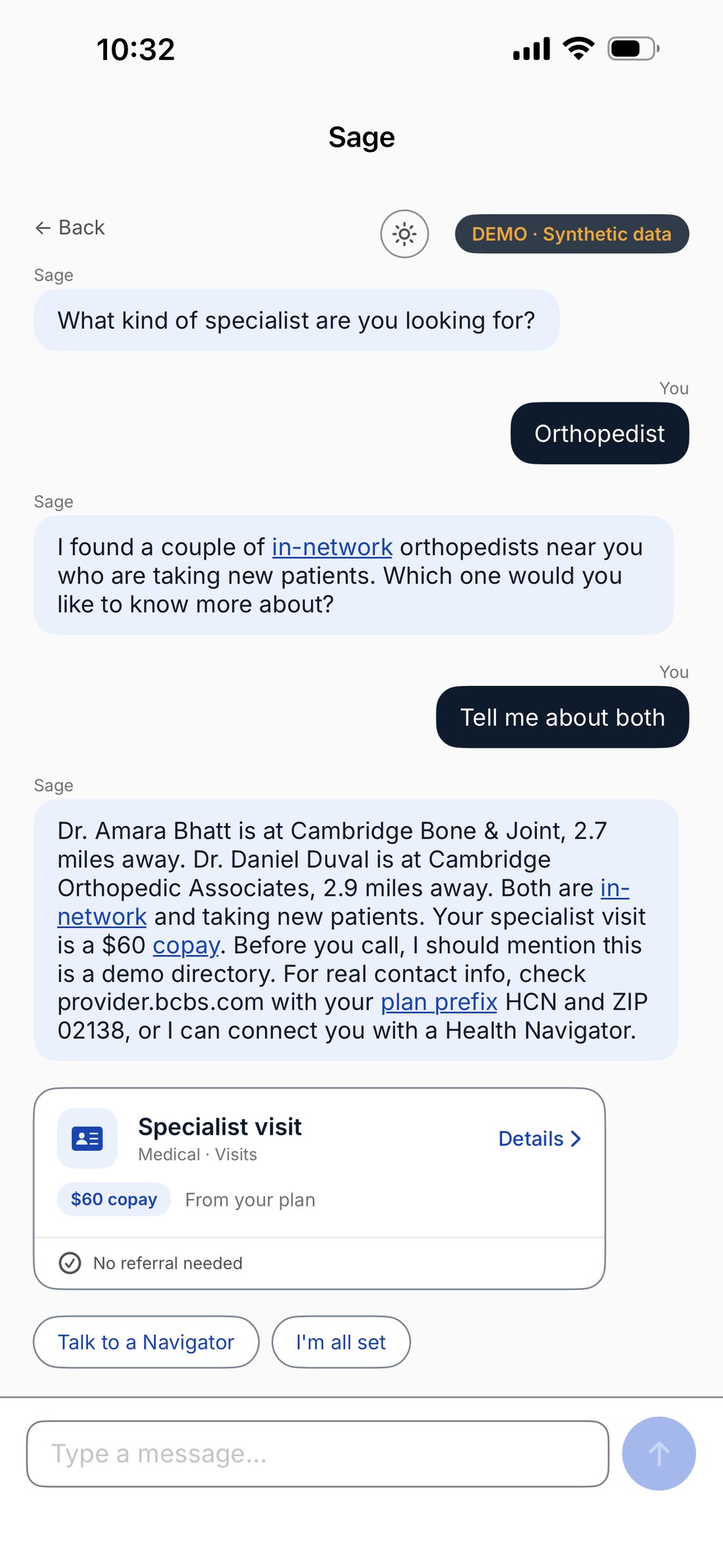
Three surfaces, one system.
I built one backend, three real items: a live web app, a native SwiftUI iOS app, and the Figma file the other two stay in sync with. Every screen exists at mobile, tablet and desktop as real reflows, not scaled frames, and a re-audit across all three found and closed seven gaps when I previously thought it all worked seamlessly. Search matches terms for conditions and treatments, not benefit names, so “CBT” surfaces the therapy visit, the psychiatrist visit and two programs, backed by filling the benefit taxonomy across all eight hubs first.
Same question, two correct and plan-specific answers. The agent isn’t retrieving a generic definition, it’s reading this member’s plan and answering for them.
Status, September 2026: live on the App Store, version 1.0, build 6. One disclosure now reads the same across the app, the web app, the privacy policy, the store listing and Figma: the people, claims, providers and conversations are fictional; the coverage terms come from real published plan documents under an invented carrier name; none of it describes a plan you can buy. The precision matters because saying “all the data is fake,” hid the most interesting true thing about the project.

Built to a checkable bar, not a metrics claim.
Real, deployed, reachable on three surfaces. A token-level design system verified to WCAG 2.1 AA with computed contrast, not eyeballed. Five templates covering 90+ benefits through configuration. Twelve demo profiles with plan-accurate data, and a cost layer that went from twelve of twelve plans wrong to none. Success metrics are defined, ready for V2 usability testing:
Self-service resolution
Share of conversations resolved without a human handoff.
Time-to-answer
From question to actionable information.
Plain-language
Whether members can correctly restate what they were told.
Handoff trust
Member-reported confidence in the handoff itself.
“Invented data can cosplay the confidence of real data, and nobody thinks to check it.”
The split between shared benefit definitions and per-employer cost is still the right architecture. I filled that cost layer with invented numbers and scaled them across eleven more plans, which scaling made the guess look systematic, which made it harder to notice. For months one part’s answers were grounded in nothing while it was carrying the numbers the whole product promises are the member's own. A data review didn't catch it; following one incorrect copay backwards until it no longer matched any plan document did. Everything that audit found had been visible for weeks, and I missed it by opening the same screens on the same device in the same appearance. Writing the rules first was the highest-leverage decision. Exercising the behavior instead of authoring it proved the rest.
Try the web app →